
File uploads on product pages,
made for makers and creatives.
Let your customers attach photos, designs, PDFs, and laser-ready SVG / vector files to any Shopify product. AI content moderation, print-quality scoring, per-file fees that actually charge at checkout, and your files in your own Drive, Dropbox, or S3. Built for UV printers, hat-bar parties, sublimation makers, designers selling prints, and any creative shop where customers bring the artwork.
Let's build something awesome.. together.

Free for Maker Growth Hub members. Members get the Studio tier comp'd, plus a head start on PartyKit AI Studio (coming next).
Drop the block on any PDP
Theme app extension installs from your theme editor in two clicks. No theme code edits. Works with Dawn and most modern Shopify themes.
Safe Uploads, built in
In-browser NSFW moderation (free), low-resolution warnings before fulfillment, and an optional hold-for-review queue for flagged content. Nobody else in the category combines these.
SVG & vector — accepted safely
Laser, vinyl, and engraving makers take the native cut files their machines need, not just photos. Most upload apps block SVG because it's an XSS risk — PartyKit sanitizes every SVG server-side (scripts and injection stripped), so you get vector support without the security hole.
Per-file fees that actually charge
Configure a fee per upload, per MB, or both. A Shopify Function injects the fee at checkout. No fake invoicing flows. Plus tier merges the fee into the product line price.
Bring your own storage
Default: Shopify Files. Or ship uploads into your own AWS S3, Cloudflare R2, Google Drive, or Dropbox. Files land in clean per-day folders alongside a sidecar JSON with all the context.
Per-variant crop ratios
Different variant, different aspect ratio. Square art for the 11oz mug, landscape for the 15oz. Set once, the storefront block swaps automatically as the customer changes variants.
Sidecar metadata → AI-workflow ready
Every upload drops a sidecar JSON — dimensions, quality score, order, moderation status — right next to the file in your own Drive, Dropbox, or S3. Point a RIP hot folder, a Zapier / n8n flow, or an AI pipeline at the folder and it runs itself, no API calls. PartyKit AI Studio (coming) adds pre-built upscale, background-removal, and vectorize skills on your own AI keys.
Built for the way makers actually work
One file uploader, six different maker workflows. We've shipped this for each of them.
UV print shops
The pain: You waste ink every time a customer uploads a 400×400 logo and expects it to print at 4 inches.
PartyKit handles it: Print-quality scoring catches low-res files before fulfillment. Per-file fees pay for the operator time on every custom order.
Hat-bar party hosts
The pain: Group events. Guests uploading designs from their phones in 30 seconds. You can't police every file in real-time.
PartyKit handles it: AI moderation blocks the obvious problems before they land. Hold-for-review queue catches the edge cases. Multi-slot uploads handle the patch, the clip, the tag in one flow.
Sublimation & DTF apparel
The pain: PNG transparency. Per-side designs. PDFs from designers. Customers who send phone photos instead of art files.
PartyKit handles it: PDF preview built in, transparent PNG-first design, per-variant aspect ratios for front-vs-back placement, photo-quality warnings before you press the shirt.
Designers selling prints
The pain: Your art on their products. You want the customer experience to feel as premium as your portfolio.
PartyKit handles it: No theme code edits. Block inherits your store's typography. Customizable accents. Filename privacy keeps customer URLs out of cart receipts.
Laser engravers & CNC
The pain: Vector files only. High-DPI raster fallbacks. Customers sending random JPGs that won't engrave cleanly.
PartyKit handles it: Restrict allowed file types per product (SVG / PDF only when you need it). Quality scoring with custom DPI thresholds. Hold-for-review for anything iffy.
Photographers & portrait artists
The pain: High-resolution originals. Multi-MB files. Customers expect a tasteful upload experience, not a Shopify hack.
PartyKit handles it: 20MB upload limit out of the box, scalable up via S3 / R2. Sidecar metadata so your retoucher gets resolution + customer + order info in one JSON. Pure-Polaris admin.
Selling something else custom? Sign makers, vinyl decals, phone cases, pet portraits, photo books, custom mugs — if customers send artwork, this works. Read the FAQ →
See it live on a real product page
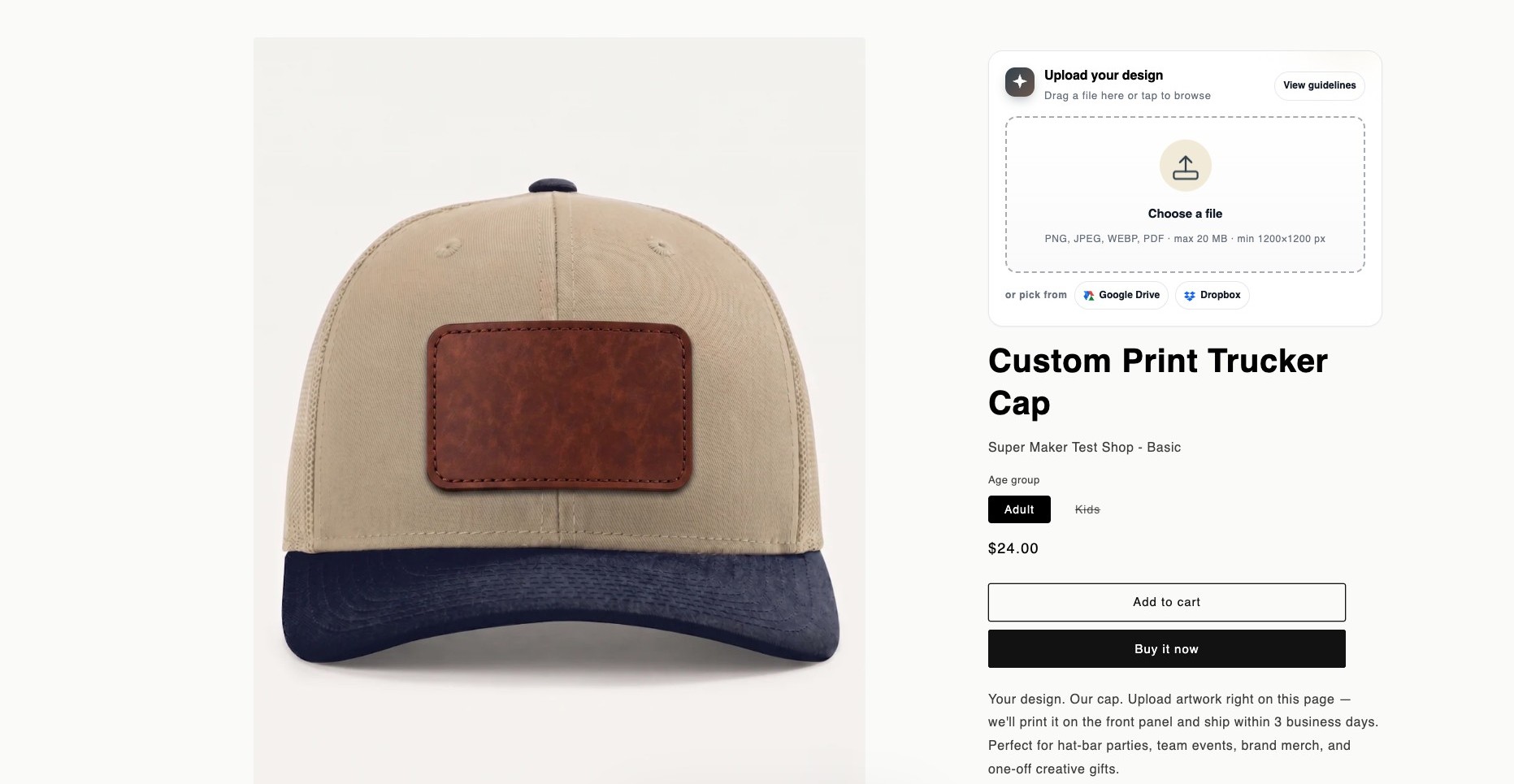
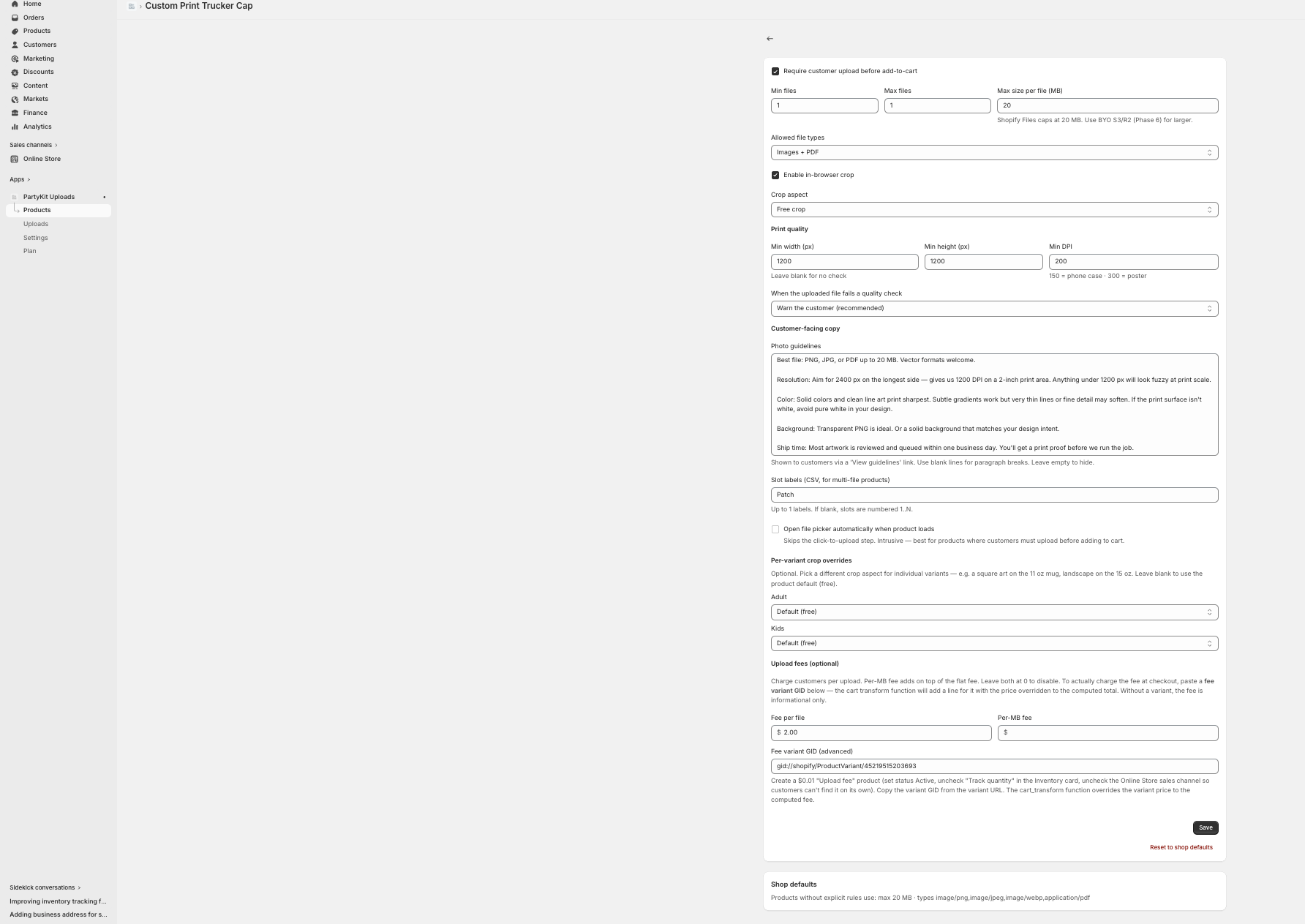
This is one of our merchants' actual storefronts — the cap product with PartyKit configured for the leather front patch. Drop the block on any product, set the rules in the embedded admin, and you're live.
You don't have to be the bad guy.
Every custom-print shop has the story. A customer uploads something inappropriate — NSFW, hateful, copyrighted, celebrity likeness. Without moderation, your team sees it. You write the awkward email. The customer argues. The order sits in limbo. Now you're the bad guy.
PartyKit catches it before the file reaches your team. The customer gets a polite “this can't be printed, try a different image” from the system, not from you. Your fulfillment crew never sees it. Your brand stays out of hot water.
In-browser NSFW classifier
NSFWJS runs in the customer's browser before upload. Blocks porn, gore, and explicit content. Zero cost to you, file never touches your server.
Hold-for-review queue
Borderline content (copyrighted, branded, gray-area) routes to a queue. Approve or reject with one click. Customer sees a friendly “under review” status.
Bring your own AI key
Plug in OpenAI, Anthropic, or your own classifier for custom rules. Block specific brands, religious imagery, political content, whatever your shop policy is.

How we compare to UploadKit
Same core feature set. Sharper pricing. Things they don't ship at any price.
Not ready to install? Start by getting paid for uploads.
The Custom Product Profit Playbook is a free, no-fluff guide to charging for custom artwork — the 5 pricing models, a 3-minute profit worksheet, and copy you can paste straight onto your product page. Brand-new shop or established, you'll leave knowing your number.
Get the free Playbook →Built by makers, for makers and creatives.
PartyKit Uploads is part of the PartyKit family of Shopify apps from Tumbly Haus Creative. Use the speed. Keep the soul.
Install on Shopify